Thursday, August 28, 2014

Google Loon Takes Off to the Sky

Google is trying to give affordable Internet access to 4.8 billion people who live in rural and remote areas, with the help of Google Loon. Google loon is a device that has been made with polyethylene plastic sheets and looks like a hot air balloon.


This is a research project that started at New Zealand in June 2013 by Google Inc. and is supported by the company's own research department Google X. During its  first testing phase, they launched 30 balloons from New Zealand's South Island. These balloons were connected to each other in a circle via wireless Internet with a handful of ground station, and passed signals to one another in a kind of daisy chain.

The local people didn’t know about this project when it was launched for the first time, but they still allowed Google to attach the receiver (like a basketball) to an outside wall of their property in order to connect to the Internet.


The proposed scenario of Google loon is that, at high-altitude, a network of balloons will be placed in the stratosphere approximately at 20 km (approximately 65616 feet) above the earth, traveling at the edge of space moving with the wind (with speed Between 5 and 20 mph) at altitude of about 20 miles (32 km) to create an aerial wireless network with up to 3G-like speeds.


How Google Loon Works


Google Loon balloons are floating into the stratosphere twice as high as airplanes, but below the range of satellites and weather, handle by using software algorithms to determine where its balloons need to go. The balloons are filled with Helium gas and mixture of air. As they need to move with the air, the balloons can be arranged to form a large communications network. 


The ‘Google loon balloons' carry signal around the earth by winds and they can be steered by rising or descending to an altitude with winds moving in the particular direction. The Loon team can access the web- based control system from any computer or tablet. In the stratosphere the balloons are connected to each other, and the signals are bounced from one balloon to another, which forms global Internet on the earth. People will connect with this network by using a special Internet antenna which is attached with the user house as shown in the picture below.


Google Loon has three parts: Envelope, Solar panels and Equipment.

Envelope

It is the inflatable part made form polyethylene. This part is able to hold high pressure and low pressure (1/100 atm). This part is resistant to ultraviolet rays and is capable to working in low temperature like -58 °F.

Solar Panels

Google loon are outfitted with solar panels, which produce 100 Watts of power in full sun, the balloons run on solar power during the day and a battery at night. By moving (with wind) and charging (with sun) balloons are able to power itself to use renewable energy source.

Equipment

In equipment there are “circuit boards (for control the system), radio antennas (for communication with other balloons and with Internet antennas on the ground), batteries (to store solar power and balloons can operate during the night with this power) and weather instruments (to monitor the conditions and weather around them). The balloons and equipment can be re-used and life time of each Google loon balloon is approximately 2- years.


Sunday, August 17, 2014

Turning your Dream into Reality: Journey of a Tech Startup

As M & M Innovators becomes 5 months old, I the CEO of the company will be sharing all we have learnt so far.  This is the continuation of my previous blog post Turning your Dream into Reality: Roles of a Tech Startup CEO (http://mnminnovators.blogspot.co.uk/2014/04/turning-your-dream-into-reality-roles.html)


To start with, to be honest I didn’t think it would be so difficult to run your own business but the cofounder of the company and I seem to be doing fine. Following your dream isn’t an easy thing to do as it involves a lot of risks but once you know your goal the risks are worth taking. Likewise the journey of following our dream hasn’t been easy as we have faced many problems so far.

In this blog we will share what we have learnt so far, hoping it will help people who want to start their own business.


Lesson 1: Patience

I must say this has been the most difficult thing for me but I am learning. Starting your startup isn’t like how it happens in movies, its not like you develop an App and you become a millionaire over night. You need to be patient with your ideas, your products and your clients. Personally I hate to wait, I think I have the least amount of patience for anything but when it comes to business you have to wait for clients emails, calls, meetings and they can take weeks to get back to you, but that doesn’t stop me from checking my email like 10 times a day just to see if they have replied.

The key thing is you have to be patient because your idea may seem amazing to you and your clients may love your work but the legal processes like signing MOU’s take time and if you have clients that are located in different countries the time difference makes it worse. We have suffered with both, as one project had so many partners that it took like 4 months to actually get the MOU signed and another client of ours is in Dubai so the time difference really made it difficult for us to have meetings with them. But all is good that ends well; we are happily working with them and continue to take up such challenges in future.

Lesson 2: Hire the Right People

Since setting up a startup is hard work, you need people who won’t be looking for shortcuts; unfortunately I am still learning on how to hire the right people. We started with a team of 8 developers and are now left with 6, the reason being I can’t compromise on work quality as for me my company is my dream and with time you learn that not everyone is sincere with their work. I know I am a workaholic but to make a startup successful you need people who are willing to put in all the effort that is required to make the product successful.

Secondly you need to be careful about the employees who are putting in a lot of effort but can’t seem to deliver work on time. Being a startup your key priority is to be efficient because you really don’t have the luxury of wasting resources.  You need to have team of highly efficient and motivated people in order to make your company successful.

Lesson 3: Supportive People

Yes, you need that one person in your team that you can rely on when everything seems wrong. Thankfully I have two such people my CTO and team lead. Whenever things don’t go as planned they are right by my side with alternate solutions. You need people around you to support you. Starting your own startup isn’t a joke and can be very stressful even if everything is going according to plan, which is never the case with us.  

In the support team, your family is the key.  I must say we are lucky enough to have amazing parents who believe in our dreams and have helped us so much with everything and for being so understanding as setting up a startup requires a lot of time commitment. Without the support and prayers of our families I doubt we would have made it so far.  


I would like to conclude with a recent achievement of ours, our program Eduvators has officially been granted funding by the government and we hope to make our countries an educated state. For more info regarding the program visit http://www.mnminnovators.com/#Eduvator

Monday, August 4, 2014

Worried Teacher meets Dexter!!!


Today we will not be talking about any new technology rather we will be having a conversation between a confused teacher who doesn’t know how to evaluate her students assessments and a know it all professor who is up-to date with online assessment tools.


 Lema: I am worried about my students tests results and I don't know if the problem is with my questions or my students as they aren’t performing well in my course. This is a question that keep running in my head over and over !! help me please !!


Dexter (annoyingly genius): Hmmm…. so you want to know if your questions are not too easy or too difficult for students to solve?

Lema: Yes ... I also want to know if my questions could help me distinguish between high achieving and low achieving students. In other words, I want to make sure that a student who had a high score in the test will succeed to answer the question and students who have low scores will simply fail to answer the question.

Dexter: So you need to find the difficulty and discrimination of your questions?

Lema: .Oh yes … I guess that is what I meant.

Dexter: Well, that is easy to do. Have your students attempted the tests in a virtual learning environment ???

Lema: Haaa !!! virtual learning environment  !!!

Dexter: Chill….I meant something like Moodle[1] or Blackboard[2]?

Lema: No no I didn’t, I still don’t know why you asked that

Dexter: Because Moodle and Blackboard simply provide you with this information. After students finish the test you could see which questions were easy and hard. Anyways you don’t need a virtual learning environment to answer your question

Lema:Ok what should I do?

Dexter : Insert your data into an Excel[3] or OpenOffice Calc[4] sheet, don't tell you have never used them?

Lema: I did .. I did

Dexter : Ok insert your data ( contain students test answers) into Excel or OpenOffice Calc and calculate the difficulty for each question by dividing the number of students who answered the question right by the total number of student who attempted the question. If the value is low the question is considered difficult and if the value is high the question is easy.

Lema: Great. what about discrimination ?

Dexter :Well, there are different ways to calculate discrimination. I will start with the simplest one. Arrange students in an ascending order according to their total scores..Then find the difference in percentages of correct answers to a question between the top quartile and the bottom quartile students.

Lema: Ok

Dexter : It is also worth saying that some researchers choose the top third and bottom third students. You could also use something called the point perseial coefficient it finds the association (correlation) between the question score and total test score[5]. I noticed Moodle used it to calculate the discrimination


Lema: Thank you

Dexter: No worries.. I hope you find it useful …. I am sorry to tell you that this didn’t answer your question !!!! Difficulty and discrimination depends totally on the sample of students answering your question so it is hard to know if the problem is with your questions or your students simply didn’t study well.

Lema : What !!!

Dexter: Don’t worry there is a solution for that and it is called Item Response Theory[6]. I will explain it to you later … Bye for now !


References

[1] Moodle https://moodle.org
[2] Blackboard http://uki.blackboard.com/sites/international/globalmaster/
[3]Microsoft Excel http://office.microsoft.com/en-gb/excel/
[4]OpenOffice Calc http://www.openoffice.org/sc/
[5]Point Perseial Coefficient http://docs.moodle.org/25/en/Item_analysis_theoretical_background
[6]Item Response Theory http://echo.edres.org:8080/irt/


Monday, July 28, 2014

Google’s Self-Driving Car


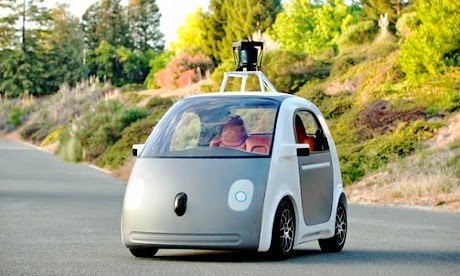
For the past couple of years we have seen Google come up with outstanding projects which still seem unreal such as the Google smart shoes, Google diabetes lens and the list goes on. Among such products Google has started working on an even out of the way idea which is Google Self-Driving car. As it is obvious from the name that this car will drive itself but what is not obvious is that it gives the driver no steering wheel, brakes or accelerator.

The concept of this car was born from the Darpa Grand Challenge 2005 for robotic vehicles in which Sebastian Thrun, who is the current led for the Google car, and his team won for their robotic vehicle Stanley. Google started working on its own self-driving car project in 2008, and has been working on it ever since. In 2011, U.S. state of Nevada passed a law , permitting the operation of autonomous cars in Nevada and by 2012 Nevada Department of Motor Vehicles issued the first license for an autonomous car, Toyota Prius which was modified with Google's experimental driverless technology. Google than continued to experiment with customised Lexus SUVs, which took the car’s existing sensors, such as the cruise-control cameras, and added a spinning laser scanner on the top.


How Google Car Works


A Google robotic car costs about $150,000 which includes $70,000 lidar  (light radar) system and is powered by an electric motor with around a 100 mile range. A Velodyn 64-beam laser is mounted on top of the vehicle as a range finder and it generates a detail 3D map of the world around the car, 360 degrees. These maps are then combined with high-resolution maps of the world to provide different types of data models that allows the car to drive itself. As of June 2014, the car uses high definition inch-precision maps of the area and can detect objects, people, cars, traffic signal and road works.


How to Drive Google Car


The car only has the capacity for two passengers. You can call the car by a smartphone for pick up from any user location with the destination set. As mentioned earlier there is no steering wheel or manual control, you just start the car by pressing the start button and can press a red button in case of an emergency. The passengers can view the weather and current speed on a small screen placed in front of them.


Once you have reached your desired destination you will see a message on the screen reminding you to take your personal belongings with you. This behaviour reinforces the fact that this car is more for a replacement of taxis without humans and not for personal use as of yet.


Until Now

After Google revealed its first prototype of the self-driving car, some people reacted negatively to the idea of having no steering wheel or brakes and having to rely on one red "panic" button in case of emergency. Meanwhile a Chinese search giant, Baidu revealed that they are also working on a concept that sounds like the Google self-driving car however a much more sensible version of it.

Baidu says that there car will be highly autonomous but it would let the driver operate and let them take control of the car anytime they want.

Google does plan to build a fleet of around 200 of these cars in Detroit with the hope of using them as an autonomous technology test bed. There are still debates going on, on how effect these cars will be keeping in mind the safely of the passengers.


References:

[1]http://www.theguardian.com/technology/2014/may/28/google-self-driving-car-how-does-it-work

[2]http://www.engadget.com/2014/07/25/chinas-baidu-to-challenge-google-with-its-own-self-driving-car/

[3] http://googleblog.blogspot.co.uk/2010/10/what-were-driving-at.html

[4] http://www.nytimes.com/2010/10/10/science/10google.html?_r=0

Monday, June 9, 2014

Solar Roadways


About eight years ago, an electrical engineer and his counsellor wife started throwing around an idea to replace asphalt on highways and byways throughout the US with electricity-producing solar panels that were tough enough to be driven upon. The idea blossomed into a project, where the panels featured built-in LEDs that could "paint the road" with markings and warnings, and could be heated to prevent snow and ice build-up. 

The US Federal Highway Administration paid the couple to produce a working prototype, which they did, and then again to expand the concept into an operational parking lot setup. As the latter contract comes to an end, the Solar Roadways project has released photos of the (almost) completed installation at its Idaho electronics lab. Now the team is dipping into crowd-funding waters with a campaign to raise funds for the move into commercial production.

Brief History


Sunlight can even break through gridlock to the road below. In 2006, Scott and Julie Brusaw hatched a plan to make use of all that untapped energy by replacing asphalt with toughened PV panels that would also include embedded lighting to act as road markings and driver alerts, as well as communication and power cables to replace overhead lines. The project received funding from the US Dept of Transportation to the tune of US$100,000 in August 2009, and work began on the first proof-of-concept prototype.

By February 2010, the first 12 x 12 ft (3.7 x 3.7 m) road panel (made up of 16 smaller connected panels) was ready, complete with embedded LEDs that could be programmed to deliver custom messages. The proof-of-concept Phase I prototype didn't include any PV cells and lacked the custom-hardened glass with integrated heating element for the upper face, but it served to demonstrate that the proposed electronics worked as promised. The team also built smaller crosswalk panels featuring load cells to test a pedestrian/wildlife detection mechanism, which would flash instructions to slow down when a weight was detected on the surface.

Around this time, Scott Brusaw was invited to give a TED talk in Sacramento (which is worth a watch as it details much of the project's inspiration, history and aims), and the project went on to win first prize in two of GE's

Methodology


Solar Roadways describes its Methodology to consist of three layers that are mentioned below:


  • Road Surface Layer


It is rough enough to provide sufficient traction, yet still passes sunlight through to the solar collector cells embedded within, along with LEDs and a heating element. This layer needs to be capable of handling today's heaviest loads under the worst of conditions and to be weatherproof, to protect the electronics layer beneath it. The surface layer will also be responsible for redirecting sunlight to hit the solar panels at the optimal angle.


  • Electronics Layer


Contains a microprocessor board with support circuitry for sensing loads on the surface and controlling a heating element with a view to reducing or eliminating snow and ice removal as well as school and business closings due to inclement weather. The microprocessor controls lighting, communications, monitoring, etc. With a communications device every 12 ft (3.7 m), a solar roadway can be an intelligent highway system.


  • Base Plate Layer


While the electronics layer collects energy from the sun, it is the base plate layer that distributes that power as well as data signals (phone, TV, internet, etc.) down the line to all homes and businesses connected to the solar roadway. It needs to be weatherproof to protect the electronics layer above it. Protect environment from Pollution.

Normal Road

Road projects are intended to improve economic and social well-being. Increased road capacity and improved pavements can reduce travel times and lower the costs of vehicle use, while increasing access to jobs, education, and health services. However, along with the positive benefits there are negative impacts on the community and natural environment. 

Solar Roads


Solar Roads facilitate global warming through air pollution from fossil fuel powered vehicles. Emissions include particulate emissions from diesel engines, carbon dioxide, NOx, volatile organic compounds, carbon monoxide and various other hazardous air pollutants including benzene.

While carbon dioxide is non-toxic to humans at low levels, it is a major greenhouse gas, and motor vehicle emissions are an important contributor to the growth of CO concentrations in the atmosphere.

Another way, roadways affect the environment is urban runoff from roads and other impervious surfaces, which is a major source of water pollution.

Rainwater and snowmelt running off of roads tends to pick up gasoline, motor oil, heavy metals, trash and other pollutants. In addition, de-icing chemicals and sand can run off into roadsides, contaminate groundwater and pollute surface waters. Road salts (primarily chlorides of sodium, calcium or magnesium) can be toxic to sensitive plants and animals.

However, there is a lot of surface area covered by roadways, and transportation by roadway vehicles as it is here to stay. Solar Roadways has the potential to address the issues mentioned above.